Many people think LinkedIn is just for finding a new job or for hiring but there are many, many other ways to utilize LinkedIn to benefit your business. Of course, if you ARE hiring, a fully built-out LinkedIn Business Page is a must (did you know you can run a hiring ad for FREE from your LinkedIn Business Page?)
What if you aren’t hiring?
Let’s explore how to determine if your LinkedIn Business Page is attracting more clients.
1. How Can You See What LinkedIn Users See?
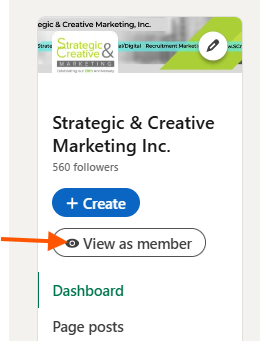
When you are an Admin on a LinkedIn Business Page and you click to that Page, you will see the Page in “Admin View.” This is where you can make updates and changes to the Page. In order to see it as a LinkedIn user would see it, just click on the left button that reads “View as a Member.” See something that needs to be changed? Click back to Admin View.

2. Do You Have a Good Banner Photo?
Many people set up their LinkedIn Business Page with the minimum amount of information to get it running. Initially, setting up a Page takes a bit of time so it is reasonable that you would just put in what is necessary at the beginning. However, make sure you don’t leave it that way.
You must have a beautiful, eye-catching banner at the top to encourage Page visitors to read through your Page and click on buttons (engagement). When visitors engage with your Page, they are much more likely to reach out to you for your services.
Your Banner must include:
• A bright, attractive photo
• Your mission statement or something descriptive about your company/industry so visitors can immediately see what products/services you provide
• Your contact information
The Page Banner below includes all necessary items:

3. How Can You See WHO has been visiting your LinkedIn Page?
Why does this matter? Checking the data on your Page let’s you determine if your Page is turning visitors into customers. As above, the more someone engages with your Page, the more likely they are to become a customer.
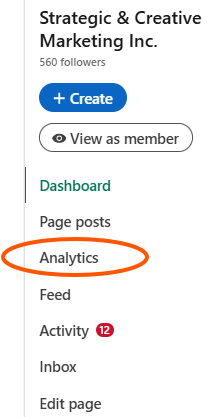
On the left side of the Page, you will see Analytics. Clicking there you will see a wealth of information about the content you are posting, the people visiting your Page, the number of followers you have, the number of leads you have collected, and how you compare to your competitors.
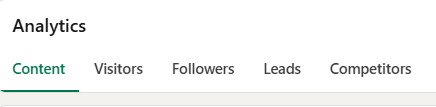
• Content: You should post at least twice a month
• Visitors – The more you see, the more your business can grow. Paid ads can quickly increase Page visitors by the hundreds
• Followers – Followers on LinkedIn see what you post so grow your Followers by posting often
• Leads – To increase your Leads, you should be running paid ads with a lead generation goal (and have someway of identifying people who land on your website from the paid ad, even if they don’t fill out a form)
• Competitors – identify your competitors and LinkedIn will show how your Page is performing compared to theirs.
Looking for another, unique way to gather business contact data from those who visit your website? SC’s data tracker, SCWebLeads, can provide you with the business and/or personal data from your website visitors. This cutting-edge tool finally lifts the curtain on those who are interested in your product or service but DON’T fill out a form. SC offers affordable packages using this feature that includes:
-
- > 15 Guaranteed Leads each month PLUS
- > 3 Facebook Ads each month PLUS
- > SEO Boost for your Facebook Business Page PLUS
- > SEO Boost for your Website
Interested in learning more? Drop your info below and we’ll reach out:
[gravityform id=”3″ title=”false” description=”true”]